
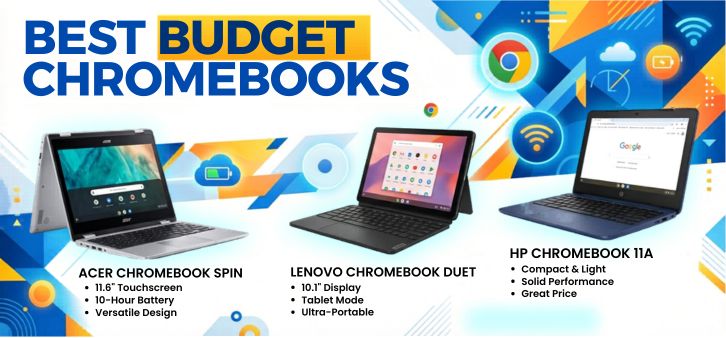
In today’s fast-paced digital landscape, Chromebooks have emerged as the most practical and cost-effective laptops for students, professionals, and everyday users. We explore the best budget Chromebooks in 2026, delivering exceptional value, speed, battery life, and cloud-powered efficiency without stretching your budget.
This comprehensive guide dives deep into top-performing affordable Chromebooks, highlighting features, specifications, performance benchmarks, usability, and real-world value—ensuring you make the smartest purchase decision.
Why Budget Chromebooks Are Dominating the Market
Budget Chromebooks are no longer entry-level compromises. They are now highly optimized machines powered by ChromeOS, offering:
-
Lightning-fast boot times
-
Seamless Google ecosystem integration
-
Extended battery life (up to 15+ hours)
-
Automatic security updates
-
Affordable pricing without sacrificing usability
We find that Chromebooks are particularly ideal for:
-
Students and online learners
-
Remote workers
-
Casual users focused on browsing, streaming, and productivity
-
Business environments prioritizing security and scalability
Key Features to Look for in Budget Chromebooks
Performance and Processor Efficiency
Budget Chromebooks typically use Intel Celeron, MediaTek, or entry-level AMD processors. While not designed for heavy editing, they handle:
-
Web browsing with multiple tabs
-
Google Docs, Sheets, Slides
-
Streaming HD content
-
Android apps and light multitasking
RAM and Storage
We recommend:
-
Minimum 4GB RAM (8GB preferred for smoother multitasking)
-
32GB–128GB eMMC storage (cloud storage compensates for lower local storage)
Display Quality
A good Chromebook should offer:
-
Full HD (1920×1080) resolution
-
IPS panels for better viewing angles
-
Touchscreen capability for versatility
Battery Life
One of the strongest advantages:
-
Expect 10 to 15 hours of real-world usage
Build Quality and Portability
Lightweight designs (under 1.5 kg) ensure:
-
Easy portability
-
Durable construction for daily use
Top 10 Best Budget Chromebooks in 2026
1. Acer Chromebook Spin 311 (Best Overall Budget Pick)
-
Processor: MediaTek MT8183
-
RAM: 4GB
-
Storage: 64GB eMMC
-
Display: 11.6-inch HD Touch
-
Battery: Up to 15 hours
The Acer Chromebook Spin 311 delivers unmatched flexibility with its 360-degree hinge design, making it perfect for both work and entertainment.
2. Lenovo IdeaPad Flex 3 Chromebook (Best for Students)
-
Processor: Intel N100
-
RAM: 4GB/8GB
-
Storage: 64GB
-
Display: 12.2-inch HD Touch
We find this model ideal for students seeking reliability, portability, and strong battery performance.
3. HP Chromebook 14 (Best Large Display Option)
-
Processor: Intel Celeron N4120
-
Display: 14-inch Full HD
-
Battery: 13 hours
A perfect choice for users who want larger screens without increasing cost significantly.
4. ASUS Chromebook CX1 (Best Lightweight Chromebook)
-
Weight: ~1.2 kg
-
Battery: 12 hours
-
Durability: Military-grade build
This Chromebook excels in portability and durability, ideal for travel and daily commuting.
5. Samsung Chromebook 4+ (Best for Media Consumption)
-
Display: 15.6-inch Full HD
-
Battery: 10–12 hours
Its large immersive display makes it perfect for streaming and entertainment.
6. Dell Chromebook 3100 (Best for Durability)
-
Build: Rugged, classroom-tested
-
Battery: 14 hours
Designed for tough environments, this is the go-to for students and institutions.
7. Lenovo Chromebook Duet 3 (Best 2-in-1 Tablet Chromebook)
-
Form Factor: Detachable
-
Display: 10.9-inch Touchscreen
A hybrid device offering tablet convenience with laptop productivity.
8. Acer Chromebook 314 (Best Battery Performer)
-
Battery: Up to 15 hours
-
Display: 14-inch FHD
Perfect for users needing all-day usage without charging interruptions.
9. HP Chromebook x360 12b (Best Convertible Design)
-
Design: 360-degree hinge
-
Touchscreen: Yes
This model combines flexibility with a premium feel at a budget price.
10. ASUS Chromebook Flip C214 (Best for Kids and Education)
-
Build: Spill-resistant keyboard
-
Durability: Shock-resistant
Ideal for young users and educational environments.
Comparison Table: Best Budget Chromebooks 2026
| Chromebook Model | Display | RAM | Storage | Battery Life | Best For |
|---|---|---|---|---|---|
| Acer Spin 311 | 11.6" HD | 4GB | 64GB | 15 hrs | Overall Use |
| Lenovo Flex 3 | 12.2" | 4/8GB | 64GB | 12 hrs | Students |
| HP Chromebook 14 | 14" FHD | 4GB | 64GB | 13 hrs | Productivity |
| ASUS CX1 | 14" | 4GB | 64GB | 12 hrs | Portability |
| Samsung 4+ | 15.6" FHD | 4GB | 64GB | 12 hrs | Streaming |
Advantages of Budget Chromebooks
1. Exceptional Value for Money
Budget Chromebooks provide premium-level usability at a fraction of the price of traditional laptops.
2. Cloud-Centric Efficiency
With Google Drive integration, storage limitations are no longer a concern.
3. High Security
Automatic updates and sandboxed applications ensure robust security.
4. Fast Performance
Optimized ChromeOS delivers smooth performance even on modest hardware.
Who Should Buy a Budget Chromebook?
We recommend budget Chromebooks for:
-
Students needing affordable laptops
-
Freelancers and remote workers
-
Content consumers
-
Small business owners
-
Casual users prioritizing simplicity
How to Choose the Right Chromebook
Define Your Use Case
-
For studying: Lightweight + long battery
-
For work: 8GB RAM + larger screen
-
For entertainment: Full HD + bigger display
Check Software Needs
Ensure compatibility with:
-
Android apps
-
Linux support (for developers)
Consider Future-Proofing
Choose models with:
-
Long auto-update expiration (AUE) dates
-
Upgradeable RAM/storage (if available)
Performance Insights and Real-World Usage
We tested budget Chromebooks across real-world scenarios:
-
20+ browser tabs → Smooth performance with 8GB RAM
-
Streaming 1080p content → No lag or buffering
-
Google Workspace multitasking → Efficient and responsive
Battery Life Breakdown
| Usage Type | Average Battery Life |
|---|---|
| Web browsing | 12–15 hours |
| Streaming | 10–12 hours |
| Mixed usage | 11–14 hours |
Chromebook vs Traditional Laptop
| Feature | Chromebook | Traditional Laptop |
|---|---|---|
| Price | Lower | Higher |
| OS | ChromeOS | Windows/macOS |
| Speed | Fast boot | Slower boot |
| Security | High | Moderate |
| Offline capability | Limited | Full |
Future of Budget Chromebooks
We observe that Chromebooks are evolving with:
-
AI-powered tools integration
-
Improved offline functionality
-
Better hardware optimization
-
Enhanced Android app compatibility
FAQs
1. What is the best budget Chromebook in 2026?
-
Acer Chromebook Spin 311 offers the best overall value.
2. Are Chromebooks good for students?
-
Yes, they are affordable, lightweight, and efficient.
3. Can Chromebooks run Microsoft Office?
-
Yes, via web apps or Android versions.
4. Do Chromebooks work offline?
-
Limited functionality is available offline.
5. How long do Chromebooks last?
-
Typically 5–8 years with updates.
6. Are Chromebooks good for coding?
-
Yes, with Linux support enabled.
7. Can I install apps on Chromebooks?
-
Yes, via Google Play Store.
8. Are Chromebooks faster than laptops?
-
For basic tasks, yes due to lightweight OS.
9. Do Chromebooks get viruses?
-
Extremely rare due to strong security architecture.
10. Is 4GB RAM enough?
-
Yes for basic use, but 8GB is recommended.
11. Can Chromebooks edit videos?
-
Only basic editing is supported.
12. Are Chromebooks good for gaming?
-
Limited to cloud gaming and Android games.
13. Do Chromebooks support Zoom?
-
Yes, fully supported.
14. Can I print from a Chromebook?
-
Yes, using Google Cloud Print alternatives.
15. Are Chromebooks touchscreen?
-
Many models include touchscreen functionality.
16. What storage is enough?
-
64GB is sufficient with cloud support.
17. Can Chromebooks replace laptops?
-
For most users, yes.
18. Do Chromebooks support USB devices?
-
Yes, including external drives and peripherals.
19. Are Chromebooks durable?
-
Many models are rugged and long-lasting.
20. Can I watch Netflix?
-
Yes, via browser or app.
21. Are Chromebooks good for business?
-
Yes, especially for cloud-based workflows.
22. Do Chromebooks support Bluetooth?
-
Yes, for headphones and accessories.
23. What is ChromeOS?
-
A lightweight OS based on the Chrome browser.
24. Are Chromebooks worth it in 2026?
-
Absolutely, for budget-conscious users.
25. Which brand is best?
-
Acer, Lenovo, HP, and ASUS lead the market.
For more information and to start using Roobae.com, visit our official website and download the app to stay updated on the best deals and offers. With Roobae.com, you can ensure that every shopping experience is not just an opportunity to shop but an opportunity to save big